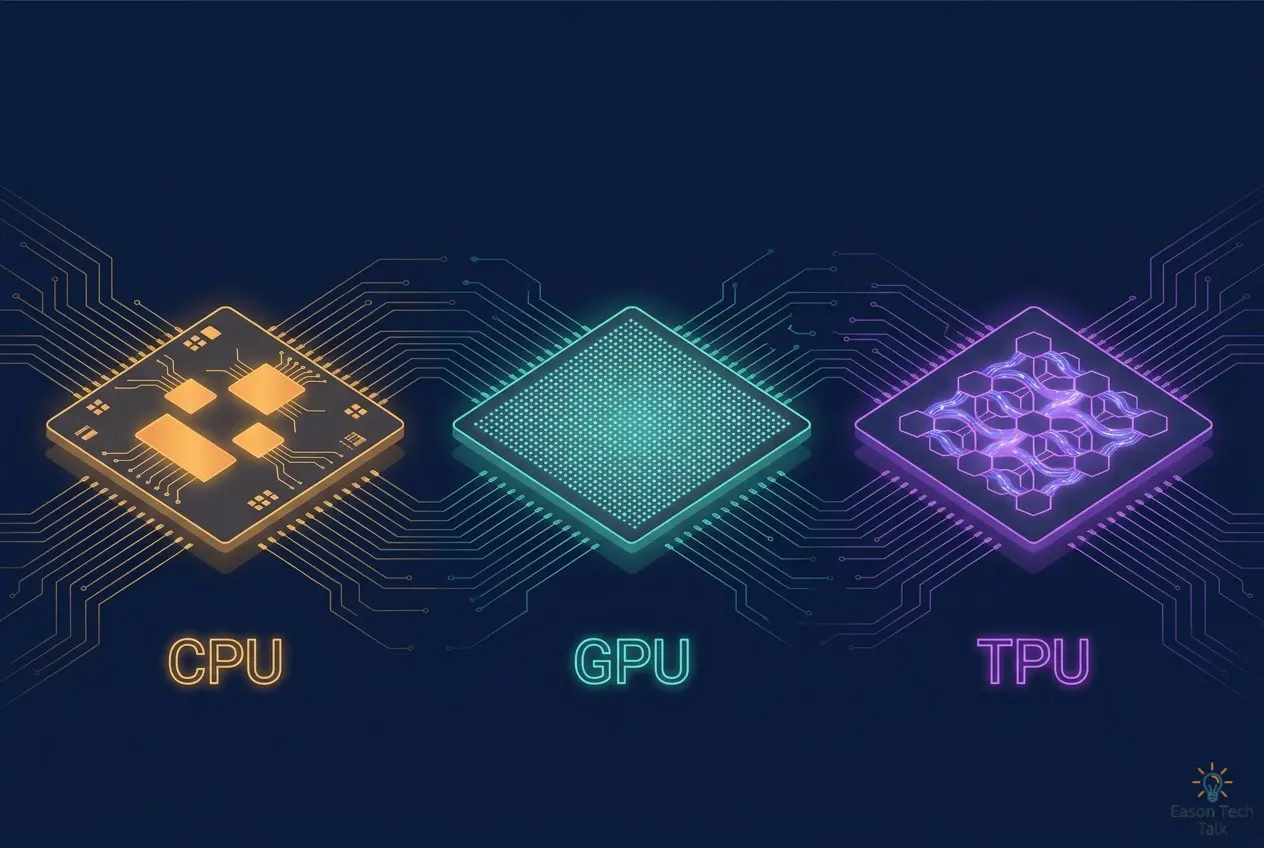
CPU vs. GPU vs. TPU: A Beginner-Friendly Guide to How These Chips Differ
In one sentence: a CPU is a versatile head chef who can cook almost anything, a GPU is a large kitchen crew that can prepare thousands of dishes at once, and a TPU is an automated central kitchen that makes one dish exceptionally quickly and efficiently.
Open the news and you will see NVIDIA reaching new market-cap milestones, Google announcing a new generation of TPUs, and AI data centers being built around the world. At the heart of these stories are three kinds of chips: CPUs, GPUs, and TPUs.
You do not need a computer science background to understand this article. We will start with an everyday analogy, gradually explore the design philosophy behind each chip architecture, and finish by explaining which chip fits each situation.
Start with an Analogy: Three Kinds of Kitchen
Imagine that you are opening a restaurant and have three kitchen options:
- The versatile head chef (CPU): One highly skilled chef can fry, steam, bake, answer the phone, keep the books, and handle customer complaints. The catch is that the chef can work on only one or two things at a time and quickly becomes overwhelmed when the restaurant fills up.
- The kitchen crew (GPU): Thousands of apprentices know only how to chop vegetables. No single apprentice is as capable as the chef, but if the task is to dice 10,000 potatoes, thousands of people working at once will beat any individual chef.
- The automated central kitchen (TPU): A production line is dedicated to making the same dish. It cannot cook other dishes or even chop vegetables, but neither of the other options can match its speed and energy efficiency for that one dish.
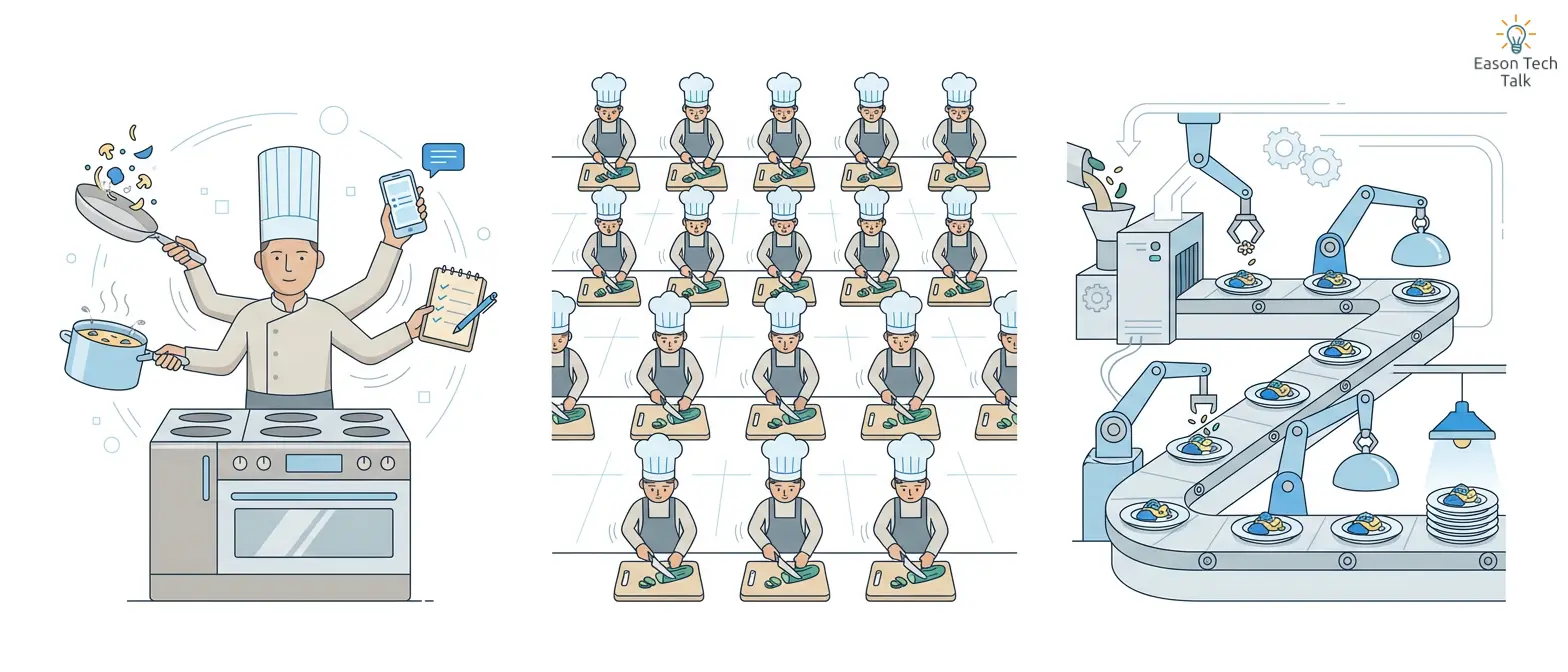
A versatile head chef (CPU), a kitchen crew (GPU), and an automated central kitchen (TPU)
The core of AI computation happens to resemble that repeated dish: enormous numbers of repeated matrix multiplications. That is why these chips evolved toward such different divisions of labor.
Layer One: What Are These Three Chips?
CPU: The Computer’s Brain
The CPU (Central Processing Unit) emerged in the late 1950s and acts as the computer’s commander. Your phone, laptop, and server all have one. It runs the operating system, opens browsers, calculates spreadsheets, and coordinates hardware resources. Almost any software can run on a CPU.
The CPU’s defining characteristics are:
- Few cores, but each core is powerful: A typical CPU has anywhere from a few to dozens of cores. Each core is smart and good at complex logic and decisions.
- One step at a time: CPUs excel at sequential processing—finishing a task’s steps in order—especially when later steps depend on earlier ones.
- Maximum flexibility: Word processing, banking transactions, and rocket-engine control can all run on a CPU.
That flexibility has a cost. For each calculation, the CPU must read values from memory and store the result afterward. Memory access is much slower than arithmetic and can become a performance ceiling. This is the well-known von Neumann bottleneck.
GPU: From Drawing Game Worlds to Training AI
The GPU (Graphics Processing Unit) arrived in the late 1990s, originally for video games. A screen contains millions of pixels, and each pixel’s color is calculated in roughly the same way. Instead of asking a CPU to process them one by one, a GPU lets thousands of smaller cores work at the same time.
- Thousands of cores: A modern GPU has thousands of ALUs (Arithmetic Logic Units) that can perform thousands of multiplications and additions simultaneously.
- SIMD parallelism: The same instruction is applied to a large amount of data at once—the same logic as thousands of apprentices chopping potatoes together.
- An unexpected talent for AI: Researchers later discovered that neural-network computation—large amounts of matrix math—looks remarkably similar to graphics math. On a typical deep-learning training workload, a GPU can deliver roughly an order of magnitude more throughput than a CPU.
Modern NVIDIA GPUs even include Tensor Cores, hardware units designed specifically to accelerate matrix multiply-accumulate operations with mixed precision. In other words, GPUs themselves are also becoming more specialized.
TPU: A Chip Built for AI
A TPU (Tensor Processing Unit) is an ASIC (Application-Specific Integrated Circuit) designed by Google. In other words, it is a chip built for one specific purpose.
Its origin is an interesting story. Around 2013, Google realized that after speech recognition improved, if every user spoke to Google for three minutes a day, the company would need to double the number of data centers. General-purpose chips alone could not scale efficiently enough, so Google decided to build a dedicated chip. The first TPU entered service in 2015 and supported products such as Search, Translate, and Photos.
The TPU takes specialization to an extreme:
- It cannot do everything else: It cannot run word-processing software or process bank transactions. It focuses on one job: matrix computation at enormous scale.
- But it does that job exceptionally well: Compared with contemporary CPUs and GPUs, the first-generation TPU delivered 15–30 times the inference performance and 30–80 times the performance per watt.
- You cannot buy one; you rent it: TPUs are not sold as standalone hardware. They run in Google’s data centers and are available through Google Cloud.
Layer Two: What Is Different in the Architecture?
Understand this section and you will already be ahead of most technology-news readers.
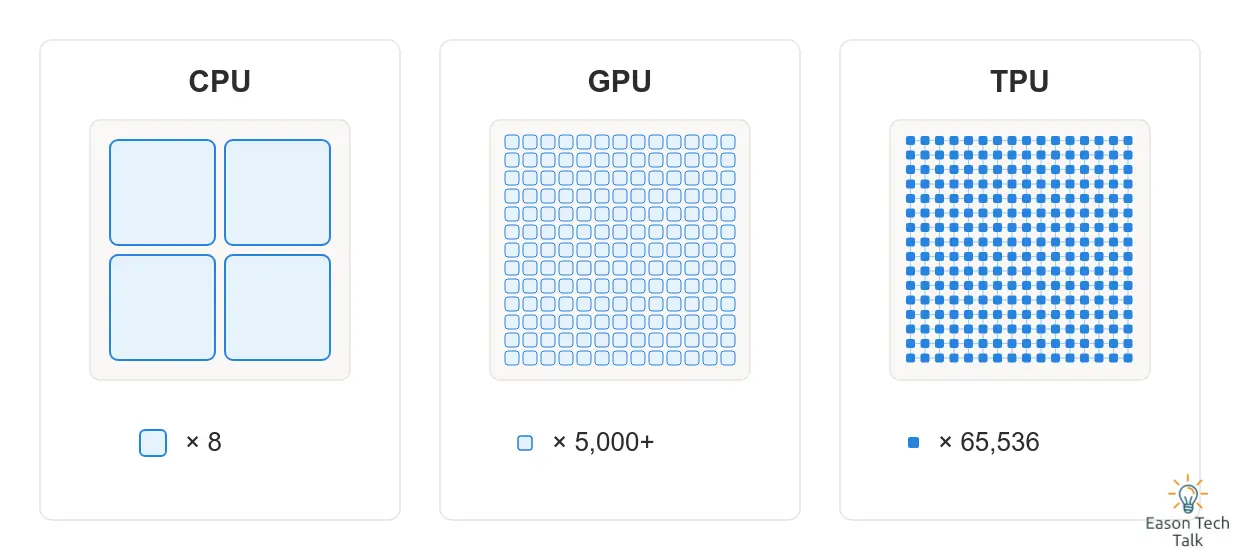
Given the same chip area, a CPU uses a few powerful cores, a GPU packs in thousands of smaller cores, and a TPU directly connects tens of thousands of multiply-accumulate units in an array
Why Is AI All About Matrix Multiplication?
When a neural network makes a prediction, each neuron multiplies its inputs by weights—which represent signal strength—and adds the results together. When millions of neurons do this at once, the overall calculation becomes one enormous matrix multiplication. Google found that its production neural networks contained anywhere from 5 million to 100 million weights. Every prediction repeatedly multiplies and adds input data with those weights.
This means that AI chip performance largely comes down to one question: how many multiply-accumulate operations can you perform in one clock cycle?
| Chip | Work per cycle | Unit of computation |
|---|---|---|
| CPU | A few | Scalar: one number at a time |
| CPU with vector extensions such as AVX | Dozens | Vector: one row of numbers at a time |
| GPU | Tens of thousands | Vector: thousands of cores working together |
| TPU | Hundreds of thousands, up to 128K | Tensor: an entire matrix tile at a time |
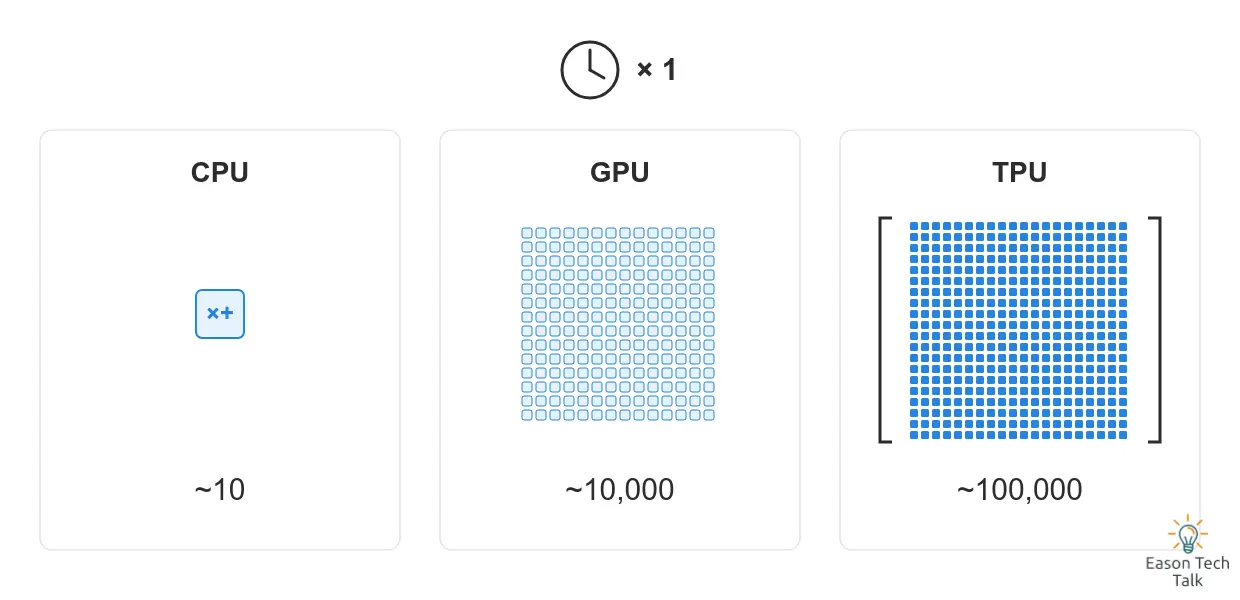
The relative scale of multiply-accumulate operations that the three chip types can complete in one clock cycle
The Heart of a TPU: The Systolic Array
A TPU can perform hundreds of thousands of operations in one cycle because of a special architecture called a systolic array:
- Every CPU or GPU calculation needs to access registers or shared memory to read operands and store intermediate results. Those accesses consume both time and energy.
- A TPU physically connects thousands of multiply-accumulate units into a large matrix. Data flows through the chip like water—or like blood pumped by a heart, which gives the systolic array its name. Each unit computes a result and passes it directly to its neighbor, so no memory access is needed during the matrix multiplication itself.
- The first-generation TPU’s Matrix Multiply Unit (MXU) contained 256 × 256 = 65,536 multiply-accumulate units. A modern TPU MXU can perform 16K multiply-accumulate operations per cycle.
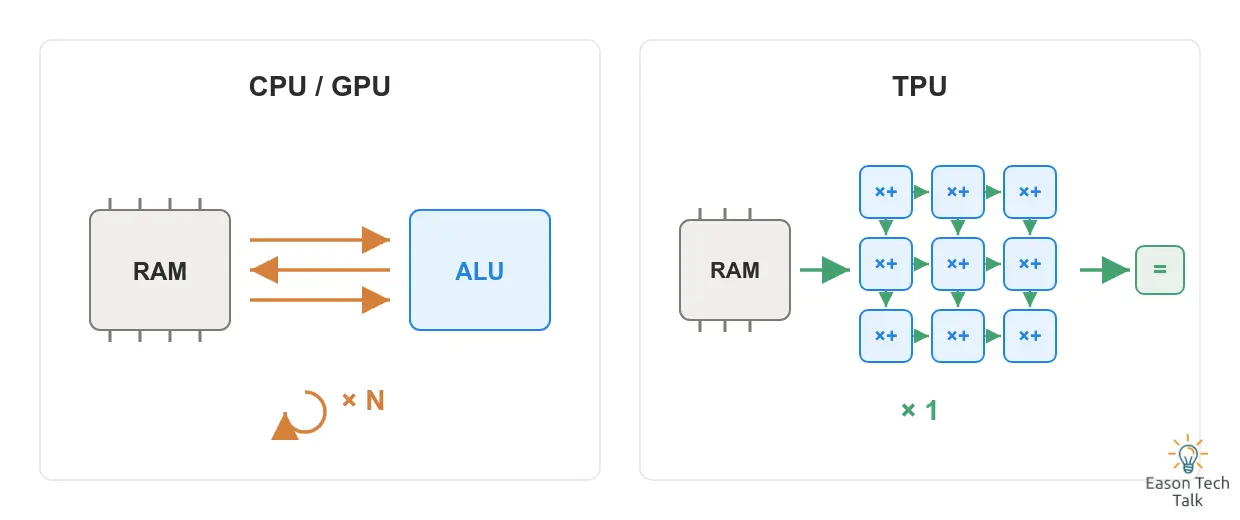
CPUs and GPUs repeatedly travel to and from memory, while a TPU lets data flow directly through a multiply-accumulate array
This is a valuable trade: give up flexibility—supporting only a fixed pattern of multiplications and additions—in exchange for extremely high compute density and energy efficiency. Wires connect only neighboring units, so they are short and efficient. Without complex control logic, most of the chip area can be used for computation.
Another Tool: Lower Precision
AI predictions do not always need extremely precise decimal values. TPUs make extensive use of quantization and lower-precision formats such as 8-bit integers and bfloat16. In the same chip area, more than 25 times as many 8-bit multipliers can fit as 32-bit floating-point multipliers, while memory use also falls sharply. GPU Tensor Cores use the same mixed-precision strategy. This is a common direction across the AI chip industry.
Three Philosophies of Memory
| Area | CPU | GPU | TPU |
|---|---|---|---|
| Memory management | Multi-level L1/L2/L3 caches, managed automatically by hardware | Each SM has L1/shared memory, with a shared L2 cache | Dedicated buffers managed explicitly by software |
| Design goal | Run almost any program reasonably well | Run parallel programs very quickly | Push matrix multiplication to its limit |
| Generality | Highest | Medium; still a general-purpose processor | Lowest; specialized for neural networks |
The key insight is that although a GPU is highly parallel, it is still a general-purpose processor that must support many kinds of applications. Each calculation still pays the cost of memory access. A TPU gives up generality more completely to reach a different level of efficiency.
Layer Three: Real Performance and Energy-Efficiency Numbers
- First-generation TPU (2015): 15–30 times the inference performance of contemporary CPUs and GPUs; 83 times the CPU’s and 29 times the GPU’s performance per watt.
- Sixth-generation TPU Trillium (2024): 4.7 times the peak performance per chip of the previous v5e generation, with 67% better energy efficiency.
- Scale: TPUs are deployed in units called Pods. Thousands of chips connect through a high-speed interconnect network designed for distributed training of extremely large models.
It is important to note that this does not mean a TPU always beats a GPU. GPUs have a more mature software ecosystem—including CUDA and native PyTorch support—can be purchased and deployed freely, and support a much wider range of applications. These advantages are why NVIDIA GPUs remain the mainstream choice in the AI market. TPUs show their greatest strengths within the Google Cloud ecosystem and on extremely large, highly optimized workloads.
Which One Should I Use?
| Your situation | Recommendation | Why |
|---|---|---|
| Everyday productivity, web browsing, and programming | CPU | The tasks are varied and sequential, so generality matters most |
| Gaming, video editing, and 3D modeling | CPU + GPU | Graphics rendering is exactly what GPUs were built for |
| Learning AI or training a small model | GPU | The ecosystem is mature, with the most learning resources and tutorials |
| Large-scale training or inference, mainly with PyTorch | GPU cluster | CUDA and framework support are the most complete |
| Extremely large training or inference with JAX/TensorFlow on Google Cloud | TPU | Very high compute density and energy efficiency; the Pod architecture is built for this scale |
| Real-time AI features on phones and laptops | NPU | See the next section |
The Extended Family
- NPU (Neural Processing Unit): If a TPU is the AI chip in a data center, an NPU is its smaller cousin inside your phone or laptop. Apple’s Neural Engine, Qualcomm’s Hexagon, and the NPUs in Windows Copilot+ PCs all belong to this category. They run tasks such as speech recognition and photo processing on the device with low power consumption.
- More ASICs: The TPU’s success inspired the entire industry. Amazon Trainium and Inferentia, Tesla Dojo, and AI chips from many startups follow the same basic path: sacrifice generality for efficiency on a specific kind of computation.
Conclusion: There Is No Strongest Chip, Only the Right Division of Labor
Return to the restaurant analogy. A successful restaurant needs a head chef (CPU) to coordinate the operation, a crew of apprentices (GPU) to prepare large quantities of ingredients, and a central kitchen (TPU or NPU) to mass-produce signature dishes. Modern AI data centers work in the same way: CPUs handle scheduling and logic, while GPUs and TPUs perform the computationally heavy work.
Understanding the match between workload and architecture is the first lesson of modern computing. Running a neural network on a CPU is like using a sports car to move house: it can move, but it is completely the wrong tool for the job.
📚 Ready to go deeper? Continue with What Does 4x4x4 Mean on a TPU? Understanding TPU Slices and GPU Design Philosophy for a closer look at TPU topology and how its design philosophy differs from GPU clusters.