
Linux Interview Classic: buff vs. cache—Understanding Page Cache and Buffer Cache with vmstat
buff and cache both consume RAM to hold data temporarily. So what actually distinguishes them—and when free shows almost no memory left, should you worry that the system is about to fail?
This article explains what buff and cache actually account for, why buff is usually tiny on modern kernels, and how to watch each counter rise in turn with a small vmstat experiment.
Buffer vs. Cache
The textbook definitions are:
- A buffer holds data while it is in transit. When data moves between components with different speeds—for example, when an application writes to disk—it can first enter a buffer so the kernel can combine smaller writes into larger batches. This is especially effective for sequential I/O.
- A cache retains data that has already been read and may be reused. Keeping frequently used data in a faster storage tier such as RAM avoids fetching it from a slower disk again. CPU caches, disk caches, and filesystem caches all follow this principle.
In short, a buffer coordinates data transfer, while a cache retains data for reuse.1
On Linux, however, that distinction does not mean “buffers are only for writes and caches are only for reads.” Buffered reads, buffered writes, and mmap() on regular files all use the Page Cache. Writes mark cached pages dirty, and the kernel later writes them back to storage.2 3
What Page Cache and Buffer Cache Mean on Linux
That general distinction becomes more specific in Linux memory accounting. The Buffers and Cached fields in /proc/meminfo have the following meanings.4
| Field | What it caches | Typical use case |
|---|---|---|
Cached (Page Cache) |
The contents of regular files, plus tmpfs and shmem; excludes SwapCached |
cat, grep, and buffered reads and writes on regular files |
Buffers (Buffer Cache) |
Raw disk blocks in a block device’s address space, plus some on-disk filesystem metadata blocks managed with buffer heads | Buffered I/O on /dev/sdX and some filesystem journal or metadata I/O |
💡 Two memory-accounting details are easy to miss
Not everything in
Cachedis disk cache. tmpfs and shmem are included as well. For a rough estimate of disk-backed file cache, useCached - Shmem. If no swap is available and those pages remain in use, they cannot simply be discarded the way clean file-cache pages can.5Not all filesystem metadata is counted in
Buffers. Only some on-disk metadata blocks are managed with buffer heads. VFS inode and dentry objects use separate in-memory caches that are normally accounted for inSlabandSReclaimable.6 4
The history explains why. The Page Cache and Buffer Cache were once separate. They were later unified, and by the Linux 2.4 era the extra copy previously required for file-data writeback had been eliminated. Modern kernels still retain a buffer cache, but buffer heads now reference pages in the Page Cache.7 8 As a result, Buffers mostly reflects raw disk blocks rather than regular-file contents and is usually much smaller than Cached.
So if this comes up in an interview or debugging session, a more precise answer is:
Cachedis primarily Page Cache and also includes tmpfs and shmem.Bufferscontains raw disk blocks for block devices and metadata blocks used by some filesystems. Inode and dentry objects mostly live in reclaimable slab. Starting with procps-ng 3.3.10,freebegan displayingbuff/cacheas an aggregate and added theavailablecolumn. In current releases,buff/cacheis effectivelyBuffers + Cached + SReclaimable.9 10
Where Page Cache and Buffer Cache Sit in the I/O Stack
The complete Linux I/O path makes this accounting easier to see.11
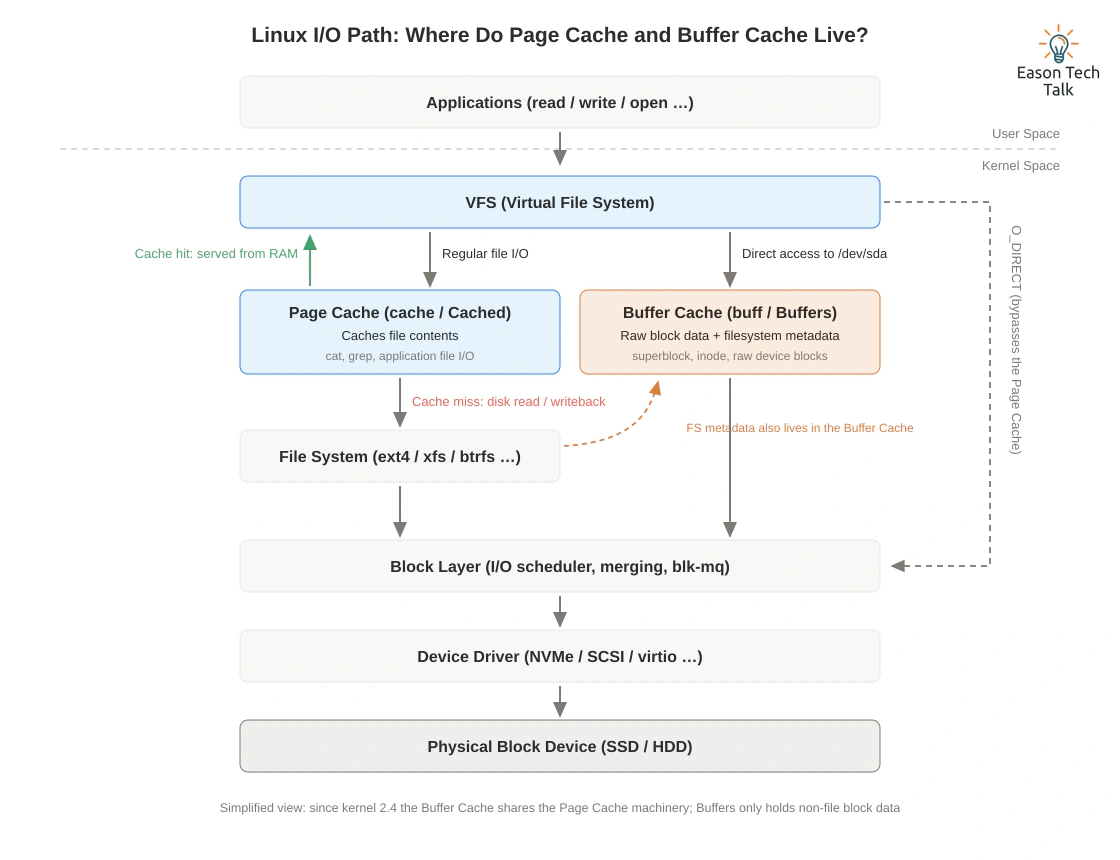
Linux I/O path: where Page Cache and Buffer Cache live
The filesystem metadata in the diagram refers to on-disk metadata blocks. VFS inode and dentry objects use the separate slab caches described above.
- Filesystem path: An application performs
read()orwrite()on a regular file → VFS → Page Cache. A read cache hit returns directly from RAM. On a cache miss—or when the kernel writes back a dirty page—the I/O continues through the filesystem to the block layer and storage.2 - Raw block-device path: Ordinary buffered I/O on a block device such as
/dev/sdXbypasses the mounted filesystem’s file-mapping logic, but it still uses that block device’s own page-cache mapping. These pages are accounted as Buffers.12 - Some filesystems use buffer heads for journals or on-disk metadata blocks, but VFS inode and dentry objects use a separate slab cache.
- Both paths eventually converge at the block layer → device driver → physical device. Applications such as databases that manage their own cache may use
O_DIRECTto bypass the Page Cache. The I/O still passes through the filesystem and block layer; it does not call the hardware directly.2
Observing buff and cache with vmstat
vmstat is a basic tool for observing system memory, I/O, and CPU activity. vmstat 1 5 samples once a second and prints five reports. The first report contains averages since boot; subsequent reports cover each sampling interval.13
$ vmstat 1 5
procs -----------memory---------- ---swap-- -----io---- -system-- ------cpu-----
 r  b   swpd   free   buff  cache   si   so    bi    bo   in   cs us sy id wa st
 1  0      0 123456  7890  56789    0    0   100   200  300  400 10  5 80  5  0
 0  1      0 120000  7895  56800    0    0   150   250  320  410 12  4 78  6  0
 2  0      0 118500  7898  56810    0    0   180   220  330  420 9   6 82  3  0
 1  0      0 116800  7902  56825    0    0   120   210  310  430 11  3 81  5  0
 0  0      0 115000  7905  56835    0    0   140   230  300  390 13  4 77  6  0
The fields relevant to this article are:
free: idle memorybuff: memory used as buffers, corresponding toBuffersin/proc/meminfocache: the cache aggregated by procps-ng, currentlyCached + SReclaimablebi/bo: KiB read from or written to block devices per second; these fields are not affected by the display unit selected withvmstat -S13 14
The values above are illustrative. On a live system, sustained bi or bo activity accompanied by falling free and rising buff or cache usually means the kernel is retaining block or file data in memory. By itself, that is normal caching—not evidence of a memory problem.15
Experiment: Watch buff and cache Rise Separately
Definitions can still feel abstract, so a direct experiment is useful. First, clear the caches to establish a clean baseline:
# Flush dirty pages, then clear page cache, dentry, and inode caches
$ sync
$ echo 3 | sudo tee /proc/sys/vm/drop_caches
drop_caches=3 discards clean page cache and reclaimable slab objects, including dentry and inode caches. Because it does not discard dirty objects, running sync first makes the results easier to interpret. This interface is intended for testing and debugging, not routine memory management, because rebuilding the caches afterward costs additional I/O and CPU.16
Scenario 1: Read a regular file → cache rises
First, ensure the test file is on a disk-backed filesystem rather than tmpfs. In one terminal, run vmstat -y 1; the -y option omits the first report containing averages since boot. In another terminal, read a large file:
$ dd if=/var/tmp/bigfile of=/dev/null bs=1M status=progress
procs -----------memory---------- ---swap-- -----io---- -system-- ------cpu-----
 r  b   swpd   free   buff  cache   si   so    bi    bo   in   cs us sy id wa st
 0  0      0 7452100  2120   98500    0    0     0     0  120  210  1  0 99  0  0
 1  0      0 6890200  2135  652800    0    0 524288    0  850 1600  2 12 70 16  0
 1  0      0 6320400  2150 1214500    0    0 524288    0  860 1620  1 13 68 18  0
The file contents enter the Page Cache, so in this illustrative output cache grows by roughly 500 MiB per second while buff barely moves. The actual increase depends on file size, read speed, existing cache, and other system activity.
Scenario 2: Read a raw block device → buff rises
Run sync and drop_caches again, then use lsblk to identify the device. Replace /dev/sdX below with the actual device name. The command reads from the device and discards the data in /dev/null. Be careful not to reverse if and of, and do not add iflag=direct, which would bypass the cache you are trying to observe:
$ sudo dd if=/dev/sdX of=/dev/null bs=1M count=1024 status=progress
procs -----------memory---------- ---swap-- -----io---- -system-- ------cpu-----
 r  b   swpd   free   buff  cache   si   so    bi    bo   in   cs us sy id wa st
 0  0      0 7450300   2150  99200    0    0     0     0  115  200  1  0 99  0  0
 1  0      0 6980100 471300  99800    0    0 460800    0  830 1550  1 11 71 17  0
 1  0      0 6420500 1023800 100300   0    0 524288    0  855 1590  2 12 69 17  0
This time, the buffered read on the block device populates the device’s page-cache mapping. /proc/meminfo reports these pages under Buffers, so buff rises significantly while cache barely changes.12
Taken together, the experiments show the distinction directly: buffered reads of regular files raise cache, whereas buffered reads from a raw block device raise buff. Your numbers do not need to match the examples exactly; background services, filesystems, and kernel versions can cause other fields to move as well.
Common Misconception: A Low free Value Is Not Necessarily a Problem
Finally, let’s return to the concern from the opening: does a low free value mean the system is running out of memory? Usually, no. Linux puts idle RAM to work as cache, so a low free value does not by itself signal a problem. When applications need memory, clean file cache and some reclaimable slab can be reclaimed. Dirty pages must be written back first, while slab objects currently in use and shmem pages with nowhere to swap may not be immediately reclaimable.4 10
Do not judge memory pressure from the free field alone:
- Check the
availablecolumn fromfree. It estimates how much memory can be used to start new applications without swapping, taking page cache, reclaimable slab, and zone low watermarks into account.4 - Check
siandsoinvmstat. Sustained swap-in and swap-out activity is an important signal of memory pressure. Merely seeing some swap space in use does not mean the system is currently thrashing.17
Summary
- In general, a buffer coordinates data transfer, while a cache retains reusable data. This does not mean “writes versus reads” on Linux.
- Linux
Cachedprimarily reflects the Page Cache and also includes tmpfs and shmem. Buffered reads and writes on regular files both use it. Buffersprimarily contains raw disk blocks in block-device mappings and metadata blocks used by some filesystems. Inode and dentry objects normally live in reclaimable slab.- Page Cache and Buffer Cache were unified during the Linux 2.4 era. Page Cache is the primary file cache on modern systems.
- A
vmstat 1experiment comparing a regular-file read with a raw-device read can showcacheandbuffrising independently. - A low
freevalue does not imply memory exhaustion. Checkavailableand swap activity as well.
The practical takeaway is simple: on modern Linux, a low free value often means RAM is being put to work—not that the system is about to fail. Check available and swap activity before sounding the alarm.
References
-
Stack Overflow — What is the difference between buffer and cache memory in Linux? ↩
-
Linux kernel documentation — The /proc Filesystem: /proc/meminfo ↩ ↩2 ↩3 ↩4
-
Server Fault — In Linux, what is the difference between “buffers” and “cache” reported by the free command? ↩
-
Linux kernel documentation — Overview of the Linux Virtual File System ↩
-
Unix & Linux Stack Exchange — 30% of RAM is “buffers”. What is it? ↩
-
Linux kernel source — buffered block-device I/O and page-cache mapping / Buffers comes from nr_blockdev_pages() / nr_blockdev_pages() implementation ↩ ↩2
-
procps-ng source — vmstat uses MEMINFO_MEM_CACHED_ALL / Cached + SReclaimable ↩
-
Fedora Magazine — System insights with command-line tools: free and vmstat ↩