What Is NCCL? Multi-GPU Communication, Tuning, and Debugging
When multiple GPUs train a model together, they need to exchange data throughout the job. On NVIDIA systems, NCCL often handles that communication. This guide explains what NCCL does, how data moves within and between servers, which settings are worth investigating, and where to start when training slows down or hangs.
What Is NCCL?
Consider a typical data-parallel training job. Each GPU holds a copy of the model and processes a different portion of a training batch. It computes its own gradients: values that tell the optimizer how to adjust the model’s parameters. Because the GPUs process different data, their gradients differ. Updating each model independently would cause the copies to drift apart.
Before updating the parameters, the GPUs therefore combine their gradients so that every model copy uses the same result. A common operation for this is AllReduce, which applies a reduction, such as a sum, across all participants and returns the result to each one. Training frameworks commonly use it to average gradients, either by scaling a sum or by using an averaging reduction. AllReduce itself does not always mean “take the average.” Other parallelism strategies, including sharded training, use different combinations of communication operations.1
NCCL, short for NVIDIA Collective Communications Library, provides these operations for NVIDIA GPUs. Besides AllReduce, it supports Broadcast, which sends one participant’s data to everyone, and AllGather, which gives everyone a copy of each participant’s contribution. PyTorch’s torch.distributed, as well as frameworks such as DeepSpeed, Megatron-LM, and JAX, can use NCCL for GPU communication.2
NCCL also handles much of the work of mapping these operations onto the hardware. It discovers the available GPU and network topology, then selects communication paths and algorithms based on the hardware, message size, and configuration. You do not have to design a transfer schedule for every NVLink, PCIe connection, or network adapter yourself.
Why does this matter? Time spent waiting for communication is time a GPU cannot spend advancing the next dependent computation. The impact varies with the model, parallelism strategy, message sizes, and how much communication overlaps with computation. A slow link or stalled participant can delay a collective across many GPUs, and the rank reporting a timeout may be waiting on the actual source of the problem. A rank is a participant’s index within the communication group; in a typical training job, each process manages one GPU rank.
How Data Moves Between GPUs
Think of GPU communication as a conversation among coworkers. Talking within one office is different from calling another office: the route and its limits change. For a GPU cluster, the first useful distinction is whether data stays within a server or crosses the network.
The following example uses DGX H100, an eight-GPU system built with H100 SXM GPUs. Other H100 servers, especially PCIe-based models, can have different layouts.3
- Within a server. DGX H100 connects its eight GPUs through NVLink and NVSwitch. Each GPU has up to 900 GB/s of aggregate bidirectional NVLink bandwidth, or 450 GB/s in each direction. This is the total across that GPU’s NVLink connections, not the bandwidth of a single link. NVSwitch provides connectivity among all eight GPUs, so an AllReduce using the local NVLink fabric does not need a network adapter.
- Between servers. Communication crosses network adapters. DGX H100 provides eight ConnectX-7 adapters for the GPU cluster network, each supporting up to 400 Gb/s. These support InfiniBand or Ethernet with RoCE, depending on the deployment. RoCE brings RDMA to Ethernet, and NCCL supports both types of RDMA network. Notice the units: 400 Gb/s is 50 GB/s before protocol overhead.
A typical inter-server path with GPUDirect RDMA on this hardware looks like this:
GPU memory → PCIe switch → network adapter → cluster network → peer network adapter → peer PCIe switch → peer GPU memory
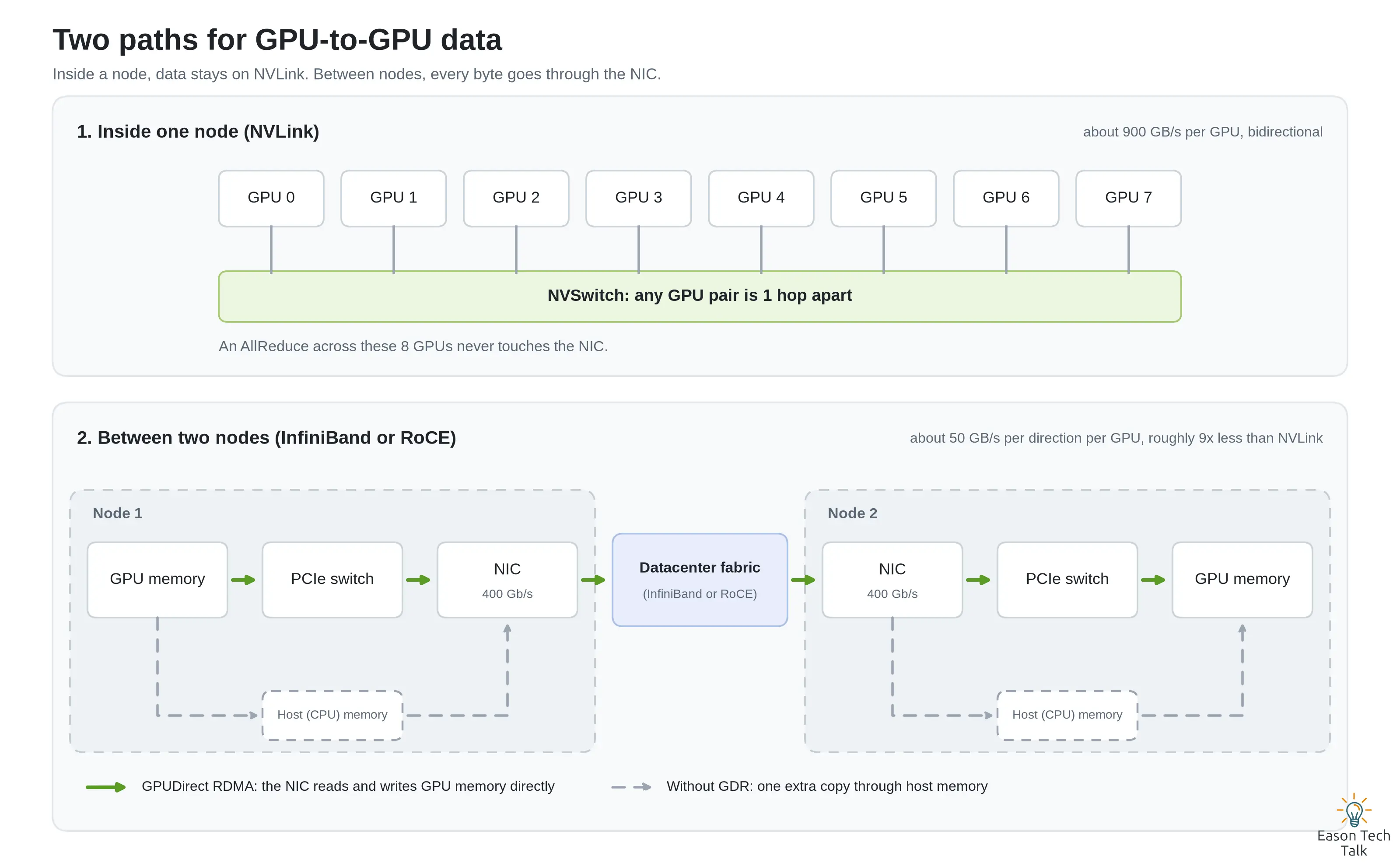
In this example, NVSwitch carries traffic within each server, while network adapters carry traffic between servers. The dashed paths show the additional host-memory transfers needed when data cannot move directly between the adapter and GPU memory. The exact PCIe path depends on the server’s topology.
Two details have a large effect on the network path:
- GPUDirect RDMA (GDR) lets a network adapter read and write GPU memory directly, avoiding an intermediate copy through CPU-accessible host memory. It can improve inter-server transfer performance, provided the GPU, adapter, drivers, and platform support the path.4
- Packet loss and congestion can delay collective communication because participants depend on one another’s progress. Retransmissions add to that waiting time. For RoCE deployments, validate the fabric’s congestion-control and flow-control design, including explicit congestion notification (ECN) and priority-based flow control (PFC) where applicable. ECN signals congestion; PFC pauses selected traffic classes to help avoid packet drops.5
How NCCL Chooses Paths and Algorithms
NCCL makes two related decisions: which connections to use and how to organize the transfers over them.
Choosing a path. Within a server, NCCL can use direct GPU transfers over NVLink or PCIe, or stage data through shared host memory when needed. Between servers, it can use an RDMA transport or a socket transport over TCP. The choice depends on topology, device access, network plugins, and configuration. If an RDMA transport is unavailable, NCCL may select sockets; other failures can stop initialization or fail the job. A network problem does not guarantee a clean fallback. When performance drops, check which transport was actually selected.4 6
Choosing an algorithm. A collective can organize the same transfers in several ways. Three useful examples are Ring, Tree, and NVLS:7 8
| Algorithm | How it works | Where it can help |
|---|---|---|
| Ring | GPUs exchange chunks with neighbors in a logical ring. Ring AllReduce combines a reduce-scatter phase with an all-gather phase, pipelining transfers across the links. | Large messages, where sustained bandwidth matters. |
| Tree | Data is reduced through a tree structure and the result is distributed back through it. Fewer sequential steps can reduce latency. | Smaller messages, especially across many GPUs. |
| NVLS | NVLink SHARP uses supported NVSwitch hardware to perform reductions, offloading part of the work normally done by GPUs. | Supported NVLink/NVSwitch systems, including DGX H100. |
These are examples, not NCCL’s complete algorithm list. NCCL normally chooses automatically; the best option depends on the collective, message size, topology, and software version.
NVLS support was introduced in NCCL 2.17, with CUDA 12.1 or later required for this capability. It needs compatible drivers and hardware, such as the Hopper GPUs and third-generation NVSwitches in DGX H100. Performance gains depend on the workload and measurement method, so benchmark the message sizes and operations your job actually uses.8 9
Benchmarking with nccl-tests
Use NVIDIA’s nccl-tests to establish a baseline and measure whether a change helps. The following example runs an AllReduce benchmark on eight GPUs in one server. It requires a C++ build toolchain and CUDA and NCCL development files; adjust the installation paths for your environment.10
git clone https://github.com/NVIDIA/nccl-tests.git
cd nccl-tests
make CUDA_HOME=/usr/local/cuda

# One server, eight GPUs, message sizes from 8 bytes to 8 GiB.
./build/all_reduce_perf -b 8 -e 8G -f 2 -g 8
If NCCL is installed outside the default search paths, add NCCL_HOME=/path/to/nccl to the build command. Reduce -e if GPU memory is limited: the benchmark needs buffers and working memory beyond the specified message size. For a multi-server test, build with MPI=1 and launch through MPI with the appropriate hosts and process placement; the command above measures only the local server.
Read the results with the units and operation in mind:
algbwis the message size divided by the measured operation time.busbwis a derived bandwidth metric that accounts for the collective’s communication pattern. For AllReduce acrossNranks,busbw = algbw × 2 × (N − 1) / N. It is not a measurement of bytes traveling over a physical link. Hardware comparisons require care, especially for NVLS and specifications that combine both directions.11
Compare runs with the same GPU count, message sizes, software stack, and topology. Start with the defaults, confirm the expected transport is active, and change one relevant setting at a time.
Debugging Slow or Stalled Jobs
An error such as unhandled system error identifies a broad failure category. NCCL’s debug logs provide the context needed to investigate it.4 6
# Investigate a problem; write a separate log for each host and process.
NCCL_DEBUG=INFO NCCL_DEBUG_FILE=/tmp/nccl.%h.%p.log python train.py

# For a routine run, keep warning/error logging without INFO-level detail.
NCCL_DEBUG=WARN python train.py
Replace python train.py with your normal launcher. For a distributed job, make sure the launcher passes these variables to every worker. %h expands to the hostname and %p to the process ID; collect logs from all participating hosts.
Start with three questions:
- What happened before the first relevant warning? Check the earliest useful
WARNmessages and the surrounding application, CUDA, and system logs across ranks. Later errors may be consequences of an earlier failure; the first warning alone is not a diagnosis. - Which network interfaces were selected? The bootstrap interface exchanges setup information. It can differ from the RDMA adapter carrying collective data, so a line naming
eth0does not by itself mean NCCL is using TCP for the data path. - Which transport carries the data? Look for entries such as
NET/IBorNET/Socket. With NCCL’s built-in IB transport,NET/IBcan mean either InfiniBand or RoCE. AGDRDMAsuffix indicates GPUDirect RDMA for that logged connection, but exact formats vary by NCCL version and network plugin. Absence of that suffix in an arbitrary log line is not enough to conclude that GDR is disabled everywhere.12
The following excerpts are illustrative; they show fields to recognize, not a log format guaranteed across releases.
Example 1: RDMA with GPUDirect RDMA. The bootstrap uses eth0, while the collective data path uses a RoCE adapter:
NCCL INFO Bootstrap : Using eth0:10.0.0.11<0>
NCCL INFO NET/IB : Using [0]mlx5_0:1/RoCE
NCCL INFO Using network IB
NCCL INFO Channel 00/04 :    0[0] -> 1[0] via NET/IB/0/GDRDMA
NCCL INFO Connected all rings
Example 2: the socket transport. The job can still run over TCP even when an RDMA device is unavailable to the process:
NCCL INFO NET/IB : No device found.
NCCL INFO NET/Socket : Using [0]eth0:10.0.0.11<0>
NCCL INFO Using network Socket
NCCL INFO Channel 00/04 :    0[0] -> 1[0] via NET/Socket/0
NCCL INFO Connected all rings
If RDMA was expected, check whether the devices are exposed inside the container, whether the drivers and userspace libraries are available, and whether the process has the necessary access. RoCE fabric faults can also produce timeouts after initialization; they do not necessarily cause NCCL to switch to TCP.
Common Symptoms and Where to Look
| Symptom | Possible causes | First checks |
|---|---|---|
unhandled system error |
An operating-system or external-library call failed; examples include insufficient shared memory or an RDMA resource error. | Read the preceding warning. If it points to /dev/shm, increase Docker’s --shm-size, or mount a memory-backed Kubernetes emptyDir at /dev/shm. Check RDMA device access and locked-memory limits where relevant. |
unhandled cuda error |
A CUDA call failed, potentially because of an earlier application error, a GPU problem, or incompatible software. | Read the underlying CUDA error and preceding logs; check GPU health and driver/framework CUDA compatibility. |
| A job hangs or times out | A rank stalled or exited, a hardware or network path slowed down, or ranks issued mismatched collectives. | Compare logs across ranks and check collective order, counts, and data types. In PyTorch, inspect TORCH_NCCL_ASYNC_ERROR_HANDLING; setting it to 1 aborts the communicator and terminates the process when the watchdog detects an error. It does not repair the cause.13 |
| RDMA timeout or retry limit exceeded | Congestion, connectivity problems, or a faulty cable, transceiver, adapter, or switch. | Check port state with ibstat, inspect counters with perfquery for InfiniBand or ethtool -S <interface> for Ethernet/RoCE, and isolate paths with ib_write_bw. Adjust NCCL_IB_TIMEOUT only when the fabric’s size and timing justify it, after checking the network.14 |
| No error, but poor performance | An unexpected socket path, unavailable GDR, an unsuitable adapter choice, or a bottleneck elsewhere in the job. | Run nccl-tests against a comparable baseline, inspect transport and topology logs, and check whether communication or computation is actually limiting training. |
Shared-memory requirements depend on the NCCL version and configuration: some versions can use cuMem host allocations instead of /dev/shm. Follow the warning’s actual allocation failure rather than assuming every system error is a shared-memory shortage.4
Summary
NCCL provides the communication operations that let NVIDIA GPUs work together. Understanding it starts with two questions: where does the data travel, and how is the collective organized? On DGX H100, NVLink and NVSwitch connect GPUs within a server, while network adapters carry traffic between servers, often using RDMA.
When training slows down or hangs, check the selected transport and the earliest useful logs, then compare nccl-tests results with a known baseline. That gives you evidence for deciding whether to investigate the hardware path, the network configuration, or the application’s collective calls.
Appendix: Terminology at a Glance
| Term | Meaning |
|---|---|
| NCCL | NVIDIA’s collective communication library for GPUs; it implements communication operations and selects paths and algorithms. |
| AllReduce | Combines values across participants using a reduction such as sum, then makes the result available to every participant. Often used to synchronize gradients. |
| NVLink / NVSwitch | NVIDIA’s high-speed GPU interconnect and switching technology. In DGX H100, they connect GPUs within a server. |
| GPUDirect RDMA (GDR) | Allows a network adapter to access GPU memory without staging the data through host memory. |
| RoCE | RDMA over Converged Ethernet: RDMA carried over Ethernet, with congestion and packet loss managed through the fabric’s network design. |
| HCA | Host Channel Adapter. NCCL uses this term for RDMA adapters, including InfiniBand and RoCE devices with names such as mlx5_0. |
| Ring / Tree / NVLS | Examples of NCCL algorithms: ring-based exchanges, tree-based reductions, and NVLink SHARP reduction offload. |
| busbw | A normalized bandwidth metric derived by nccl-tests; it is not a physical link counter. |
| rank | A participant’s index within a communication group. A training process commonly manages one GPU, but NCCL can also manage several GPU ranks in one process. |
References