
EKS Load Balancing Best Practices: Service, NLB, ALB, and IP Targets
Load balancing on Amazon EKS looks simple until you need to explain where a request actually went.
A Kubernetes Service of type LoadBalancer can create an AWS load balancer, kube-proxy can rewrite traffic again on the node, and an Ingress controller can add one more routing layer before the packet reaches the application. Each layer is valid on its own, but the combined path can create extra hops, uneven traffic distribution, and harder incident debugging.
This article consolidates my earlier three-part EKS load balancing series into one updated guide. The recommendation is straightforward:
- Use AWS Load Balancer Controller or EKS Auto Mode for AWS-native load balancer integration.
- Prefer IP targets when the load balancer should send traffic directly to Pods.
- Use instance targets or NGINX Ingress only when their trade-offs are intentional.
- Avoid sticky behavior unless the application explicitly needs session affinity.
- Spread Pods across Availability Zones so the load balancer has healthy, balanced targets.
Why the Default Service Path Adds Complexity
Kubernetes Services provide stable networking for Pods. When a Service is exposed externally, Kubernetes also needs to decide how traffic from outside the cluster reaches the selected Pods. The important field is spec.externalTrafficPolicy.
Kubernetes supports two values:
Cluster: traffic can be forwarded to Pods on any node in the cluster.Local: traffic is only sent to local Pods on the node that received the request.
Local does not mean Kubernetes stops doing Service-level balancing completely. If several matching Pods run on the same node, kube-proxy can still distribute traffic among those local endpoints. The key difference is that traffic should not be forwarded to Pods on other nodes.
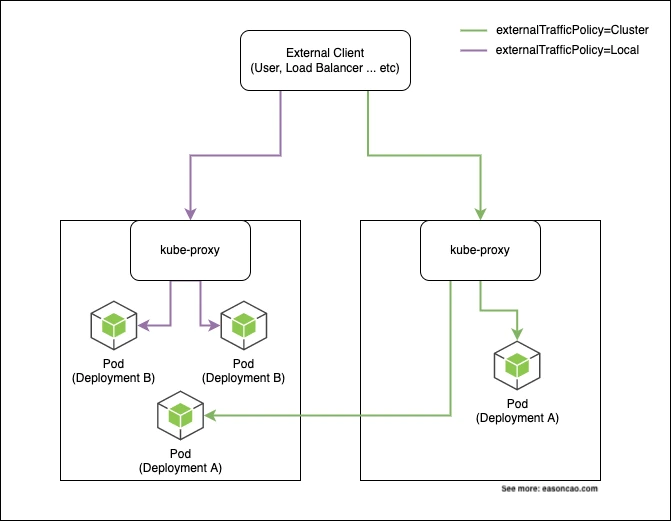
By default, kube-proxy implements Service load balancing on nodes with iptables or IPVS. In iptables mode, rules are generated with probability-based matching, similar to this simplified example:
-A KUBE-SVC-XXXXX -m statistic --mode random --probability 0.20000000019 -j KUBE-SEP-AAAAAA
-A KUBE-SVC-XXXXX -m statistic --mode random --probability 0.25000000000 -j KUBE-SEP-BBBBBB
-A KUBE-SVC-XXXXX -m statistic --mode random --probability 0.33332999982 -j KUBE-SEP-CCCCCC
-A KUBE-SVC-XXXXX -m statistic --mode random --probability 0.50000000000 -j KUBE-SEP-DDDDDD
-A KUBE-SVC-XXXXX -j KUBE-SEP-EEEEEE
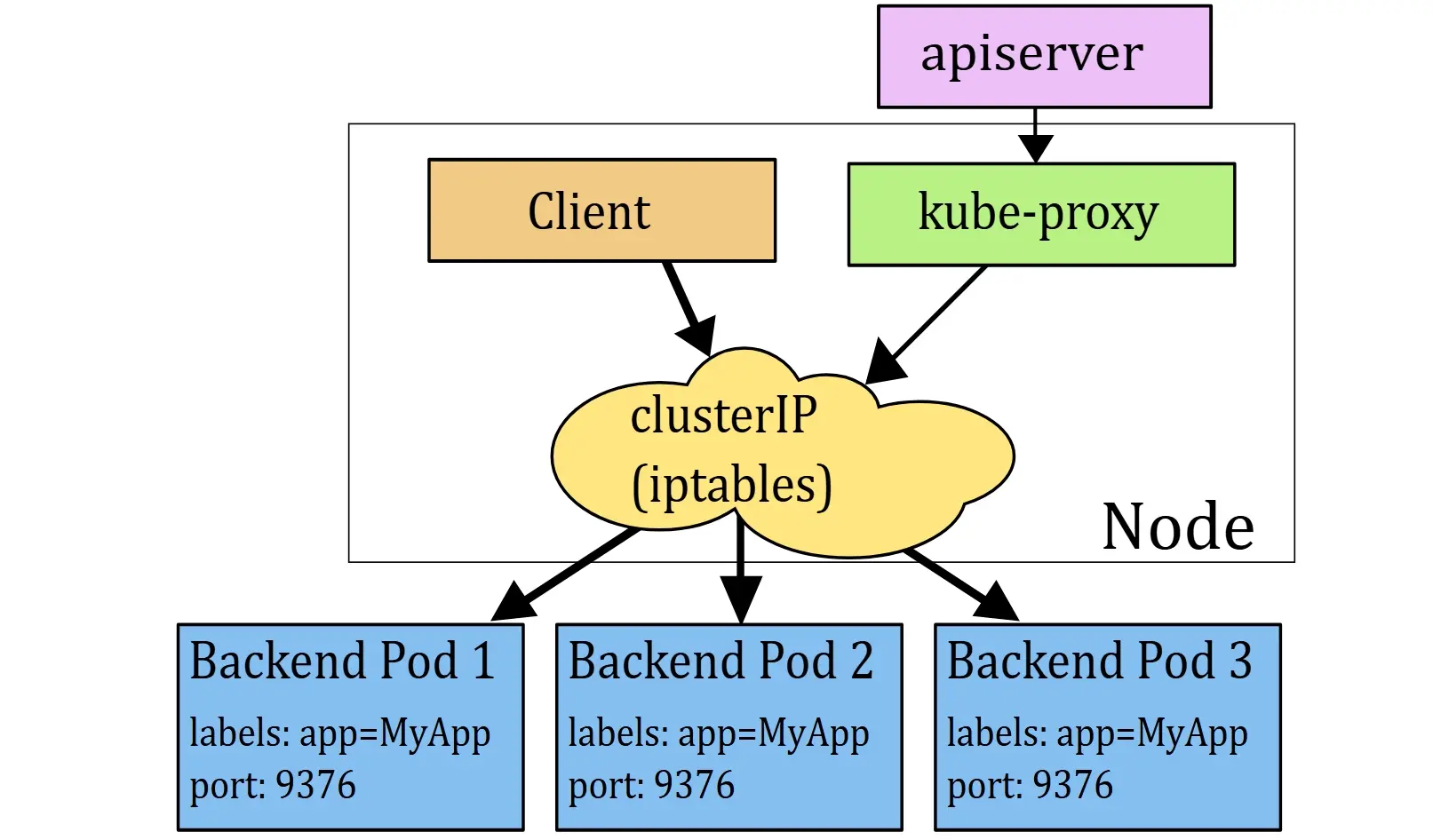
That means an AWS load balancer may first send traffic to a node, and then Kubernetes may forward the request again to a Pod. This second hop is often the part people forget during troubleshooting.
Consider this common Service:
apiVersion: v1
kind: Service
metadata:
  name: nginx-svc
  labels:
    app: nginx
spec:
  type: LoadBalancer
  ports:
  - port: 80
    protocol: TCP
  selector:
    app: nginx
With instance targets, the load balancer targets nodes. The traffic can then take one of these paths:
client -> Load Balancer -> Node-1 (NodePort) -> Pod-1 on Node-1
client -> Load Balancer -> Node-1 (NodePort) -> Pod-3 on Node-2
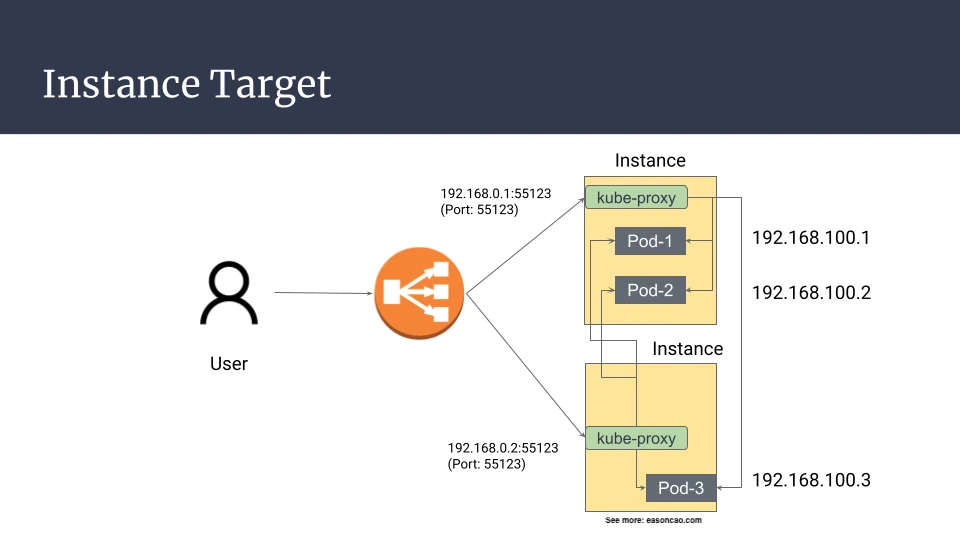
The second path works, but it adds a node-to-node hop. If Node-1 has a network issue or disappears while forwarding traffic to Pod-3, an established flow can be interrupted even though the target Pod is on another healthy node.
externalTrafficPolicy: Local avoids cross-node forwarding, but it creates a different trade-off. Nodes without a local backend Pod should fail the load balancer health check, because there is no local endpoint to serve the request.
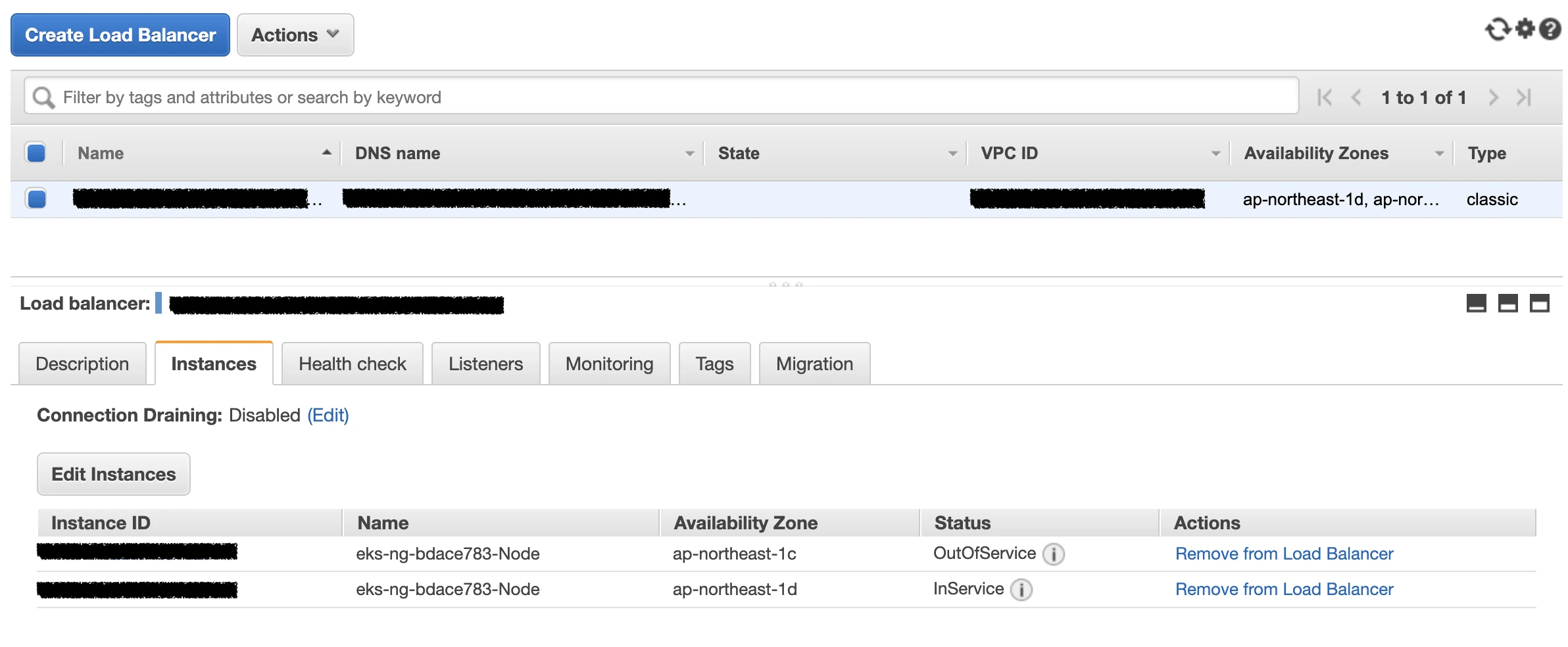
That behavior is expected. The problem is that traffic distribution now depends heavily on where Pods are scheduled. If only one node has local Pods, all healthy traffic lands there.
Why Traffic Becomes Imbalanced
The imbalance usually appears when the AWS load balancer is balanced across registered nodes, but the application load behind those nodes is not balanced across Pods.
In one test, four backend Pods returned their own Pod IP so I could count which Pod served each request:
$ kubectl get pod -o wide
NAME                                READY   STATUS    IP
nginx-deployment-594764c789-5s668   1/1     Running   192.168.42.171
nginx-deployment-594764c789-9k949   1/1     Running   192.168.39.194
nginx-deployment-594764c789-b292m   1/1     Running   192.168.29.24
nginx-deployment-594764c789-s226c   1/1     Running   192.168.15.158
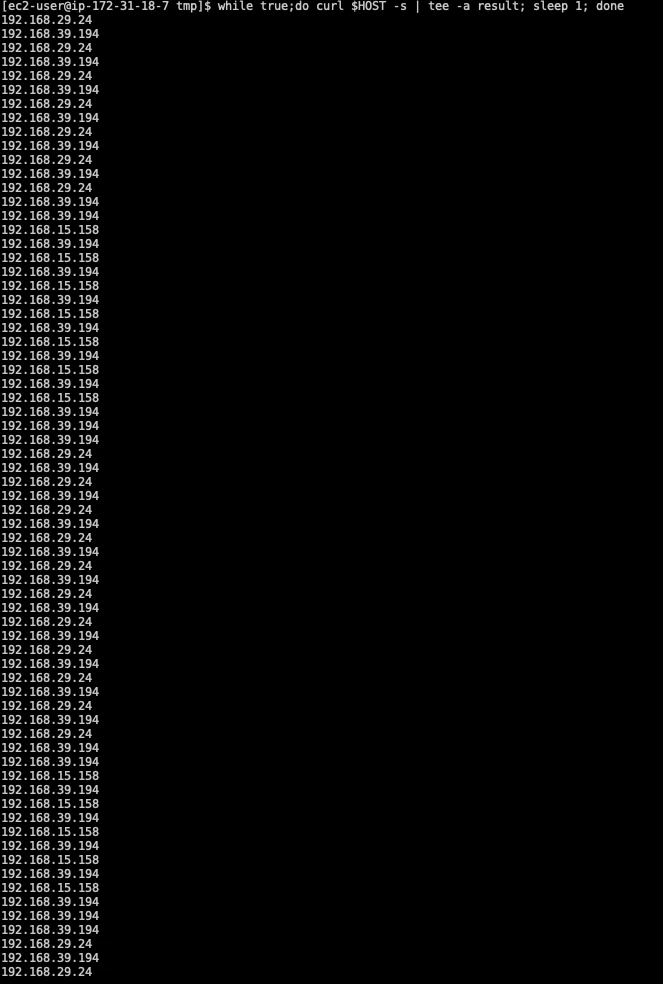
After 79 HTTP requests, the result was uneven:
192.168.42.171: 12 requests192.168.39.194: 33 requests192.168.29.24: 23 requests192.168.15.158: 10 requests
This does not mean Elastic Load Balancing is broken. It means the load balancer is distributing traffic to its registered targets, while Kubernetes is doing another layer of routing behind those targets. Once a node receives a request, the final Pod selection is controlled by Kubernetes Service networking, not by the AWS load balancer.
The effect becomes more painful at scale. More Services and endpoints mean more node-level forwarding state, more conntrack pressure, and a more complicated packet path to reason about during incidents.
Use IP Targets to Send Traffic Directly to Pods
On Amazon EKS with the Amazon VPC CNI plugin, Pods running on EC2 nodes receive VPC-routable secondary private IP addresses. That makes it possible to register Pod IPs directly in an ALB or NLB target group.
This option applies to Application Load Balancer and Network Load Balancer target groups. Classic Load Balancer does not support IP targets. Instance targets still make sense for some node-level designs, but when the application workload is represented by Kubernetes Pods, IP targets usually match the EKS networking model better.
The cleaner path is:
client -> NLB or ALB -> Pod IP
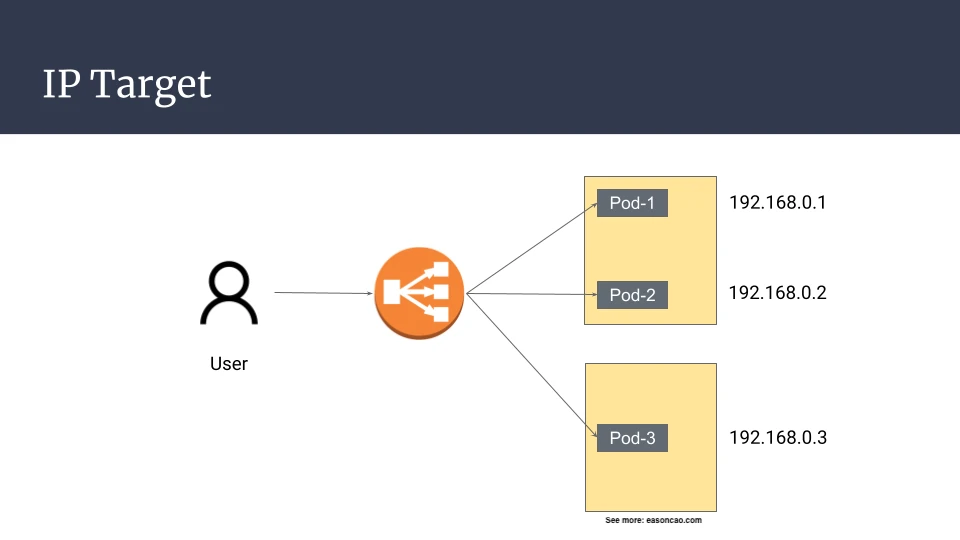
For a Network Load Balancer managed by AWS Load Balancer Controller, use a Service like this:
apiVersion: v1
kind: Service
metadata:
  name: my-service
  annotations:
    service.beta.kubernetes.io/aws-load-balancer-type: "external"
    service.beta.kubernetes.io/aws-load-balancer-nlb-target-type: "ip"
spec:
  type: LoadBalancer
  ports:
  - port: 80
    targetPort: 8080
    protocol: TCP
  selector:
    app: my-app
For an Application Load Balancer, use an Ingress with IP target mode:
apiVersion: networking.k8s.io/v1
kind: Ingress
metadata:
  namespace: game-2048
  name: ingress-2048
  annotations:
    alb.ingress.kubernetes.io/scheme: internet-facing
    alb.ingress.kubernetes.io/target-type: ip
spec:
  ingressClassName: alb
With IP targets, the load balancer forwards traffic directly to Pod IPs. In the same style of test, four Pods behind an NLB received traffic much more evenly:
192.168.17.15: 10 requests192.168.27.143: 12 requests192.168.22.126: 14 requests192.168.14.48: 13 requests
This is the main reason I prefer IP target mode for most EKS workloads exposed through AWS-native load balancers.
When IP Targets Can Still Look Uneven
IP target mode removes the extra Kubernetes Service forwarding hop, but it does not guarantee identical request counts in every situation. Traffic can still look uneven when:
- clients cache stale load balancer DNS answers;
- sticky sessions or source-IP affinity are enabled;
- targets are not evenly distributed across Availability Zones;
- long-lived TCP connections dominate the workload;
- WebSocket connections stay open for long periods;
- clients reuse a small number of persistent HTTP connections.
The fix depends on the workload. For short-lived stateless HTTP traffic, IP targets and balanced Pod placement usually solve the practical problem. For long-lived connections, measure active connections and target utilization, not only request counts.
Controller Options on Amazon EKS
Kubernetes In-Tree Load Balancer Controller
Historically, a plain type: LoadBalancer Service on AWS was handled by the Kubernetes in-tree AWS cloud provider code. It was convenient for quick experiments, but it was tied to Kubernetes release cycles and offered limited access to newer AWS load balancer features.
For modern EKS clusters, prefer AWS Load Balancer Controller or EKS Auto Mode when you want AWS-managed load balancer behavior. Treat the old in-tree path as legacy unless you have a specific compatibility reason.
NGINX Ingress Controller
NGINX Ingress Controller is useful when you want NGINX features in the request path: advanced rewrite behavior, controller-level configuration, custom routing, or one shared NGINX layer for many Ingress objects.
On AWS, a common deployment exposes NGINX through a Service of type LoadBalancer, usually backed by an NLB:
apiVersion: v1
kind: Service
metadata:
  annotations:
    service.beta.kubernetes.io/aws-load-balancer-backend-protocol: tcp
    service.beta.kubernetes.io/aws-load-balancer-cross-zone-load-balancing-enabled: "true"
    service.beta.kubernetes.io/aws-load-balancer-type: external
    service.beta.kubernetes.io/aws-load-balancer-nlb-target-type: instance
  name: ingress-nginx-controller
  namespace: ingress-nginx
spec:
  externalTrafficPolicy: Local
  type: LoadBalancer
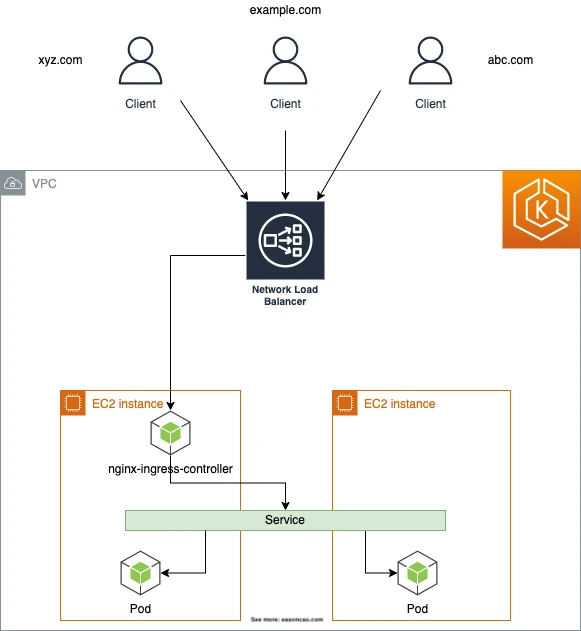
This is a valid architecture, but be clear about what it does: the AWS load balancer sends traffic to NGINX, and NGINX then routes traffic to Services and Pods. That extra layer is useful when you need NGINX behavior. It is unnecessary if the ALB or NLB can handle your routing requirements directly.
NGINX Ingress is still a good fit when you want a centralized routing layer for many namespaces, need NGINX-specific request handling, or want multiple Ingress objects to share the same NLB-backed entry point. The important point is to treat that proxy layer as an intentional design choice.
AWS Load Balancer Controller
AWS Load Balancer Controller uses AWS APIs to provision and manage ALB, NLB, target groups, listeners, rules, and related resources from Kubernetes objects. It replaced the older ALB Ingress Controller naming and now supports both ALB and NLB use cases.
Unlike NGINX Ingress, AWS Load Balancer Controller is not a gateway in the data path. It reconciles AWS resources from Kubernetes objects, and the load balancer then sends traffic to the registered targets. With IP target mode, those targets can be Pods directly.
This is usually the best default when you want Kubernetes-native manifests and AWS-native load balancing features together:
- ALB for HTTP and HTTPS routing, host/path rules, TLS termination, and web application traffic.
- NLB for TCP/UDP, static IP requirements, very high throughput, or source IP preservation scenarios.
- IP target mode when the load balancer should target Pods directly.
- TargetGroupBinding when you need to connect Kubernetes workloads to existing target groups.
- IngressGroup when multiple Ingress resources should share one ALB.
EKS Auto Mode
EKS Auto Mode can automatically provision and configure NLBs for Services of type LoadBalancer. It reduces the amount of controller installation and operations work for supported NLB use cases. If your cluster uses Auto Mode, check the supported annotations and behavior before copying older AWS Load Balancer Controller examples directly.
The broader design principle is the same: choose whether traffic should target nodes or Pod IPs, and make that choice explicit.
Practical Recommendations
Prefer IP targets for application Pods when possible. On EKS with VPC CNI, Pod IPs are routable inside the VPC, so ALB and NLB can usually send traffic directly to Pods. This removes the extra node-level Service forwarding hop.
Use instance targets when you intentionally want node-level targeting. This can be reasonable for infrastructure components, DaemonSet-style traffic, or cases where direct Pod targeting is not available.
Use NGINX Ingress when you need NGINX in the data path. Do not use it only because “Kubernetes needs an Ingress controller.” On AWS, ALB Ingress through AWS Load Balancer Controller can often provide the HTTP routing layer without running an additional reverse proxy tier.
Avoid sticky sessions unless the application requires them. Stickiness can be useful, but it directly works against even distribution. For ALB and NLB, review target group attributes before blaming Kubernetes or ELB algorithms.
Spread Pods across Availability Zones. Use topology spread constraints, Pod anti-affinity, or scheduling rules so each enabled load balancer zone has healthy backend capacity.
Tune health checks deliberately. externalTrafficPolicy: Local, instance targets, and node-local endpoints can make some nodes fail health checks by design. That is not automatically a failure, but it must match your availability model.
Conclusion
The common EKS load balancing mistake is assuming there is only one load balancer. In many clusters, traffic is balanced once by AWS and then routed again by Kubernetes on the node. That second layer can be useful, but it also adds hops, hides the final Pod selection, and can create confusing traffic distribution.
For most AWS-native EKS workloads, the cleanest design is AWS Load Balancer Controller or EKS Auto Mode with IP targets, balanced Pod placement, and no unnecessary stickiness. Use NGINX Ingress or instance targets when their behavior is part of the design, not as the default path copied from an old example.
References