
Kueue Quick Start: Fair-Share GPU/TPU Queueing on Kubernetes
This post helps you understand what Kueue is, why you need it, and how to use it on shared GPU/TPU clusters in about 10 minutes.
Why Kubernetes Alone Is Not Enough
Kubernetes can run batch workloads through Job or CronJob, but it does not natively manage admission timing, queueing behavior, and cluster-level resource governance for those workloads. Kubernetes is excellent at placing Pods on nodes, but not at deciding when a batch workload should be admitted.
For AI/ML training jobs, you often need expensive accelerators like GPUs or TPUs. In multi-team shared clusters, the native scheduling model quickly shows limitations:
- No true queueing mechanism: when resources are insufficient, Jobs may fail, or Pods remain Pending instead of being admitted by policy.
- No quota governance: one team can consume all GPUs/TPUs while others wait.
- No workload priority at admission: low-priority experiments can block high-priority production training.
- No fair sharing guarantees: teams cannot be guaranteed a reasonable share of cluster resources.
Kueue (pronounced like “queue”) is Kubernetes-native job queueing designed to solve exactly these problems. It can hold Jobs in queue and only admit them when enough resources are available within quota.
What Is Kueue?
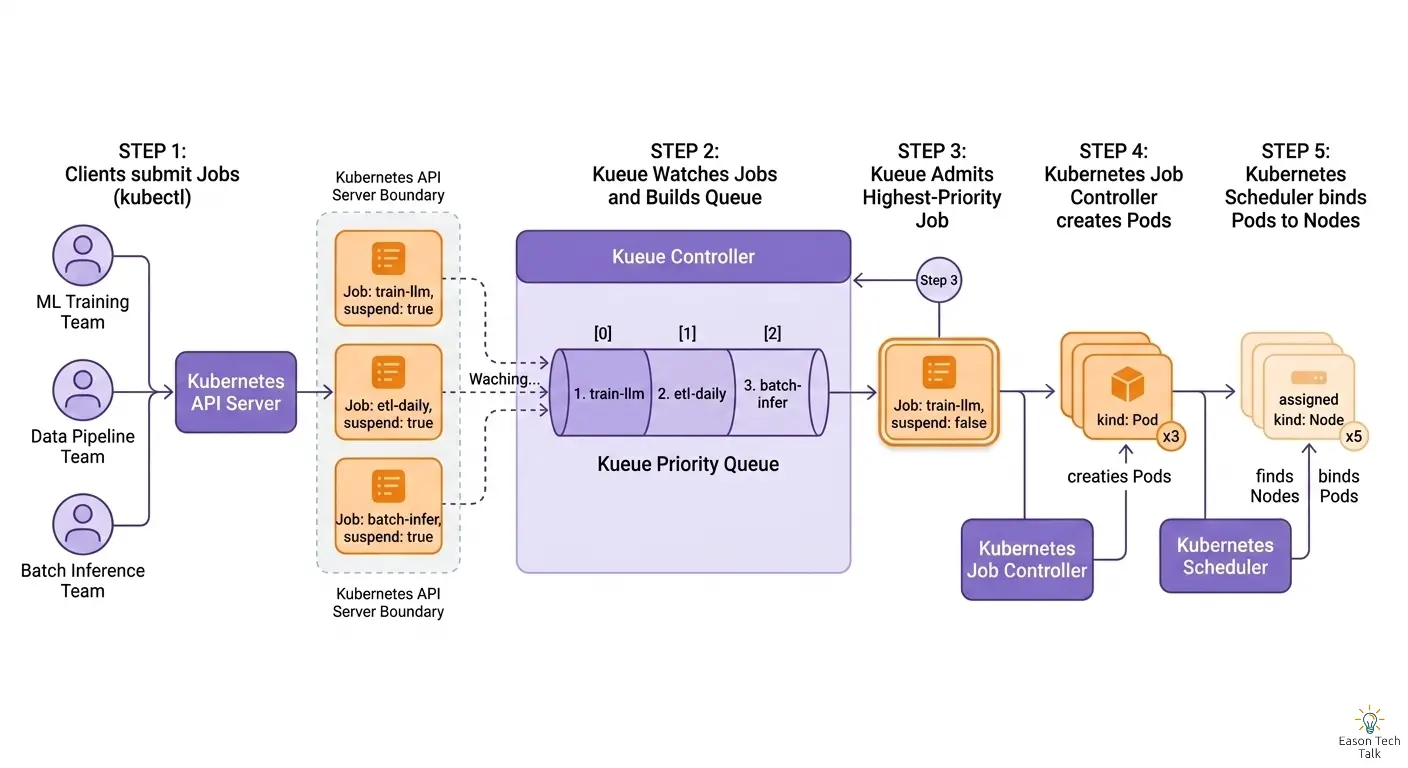
Kueue is a Kubernetes controller that sits between Job submission and the Kubernetes scheduler. It does not replace the scheduler. Instead, it decides when Jobs are allowed to start.
If Kubernetes is the cluster’s operating system, Kueue is the air traffic control tower deciding which flight (workload) can take off and when.
Core capabilities provided by Kueue:
- Quota Management: enforce per-team resource limits.
- Priority-based Scheduling: high-priority workloads are admitted first.
- Fair Sharing: distribute GPU/TPU resources fairly across teams.
- Resource-aware Admission: admit Jobs only when required resources are available.
Kueue vs Job vs JobSet
A common question is: “If I already use JobSet, do I still need Kueue?”
Yes, because they solve different layers of the problem and work best together.
| Layer | Tool | Responsibility |
|---|---|---|
| Pod scheduling | Native Kubernetes Scheduler | Places Pods onto specific nodes |
| Job orchestration | JobSet | Groups dependent Jobs into one coordinated unit (for example, 1 leader + 3 workers starting together) |
| Job admission | Kueue | Decides when a Job can run based on quota, priority, and fair-sharing policy |
- Job only: single batch task, no queue governance. Good for simple dedicated-cluster workloads.
- JobSet only: multi-role distributed workload orchestration, but no cluster-wide quota governance.
- Kueue only: queueing and quota control for independent Jobs.
- Kueue + JobSet: full solution for large-scale TPU/GPU training with both orchestration and resource governance.
In short: JobSet controls how workloads run; Kueue controls when they can run.
Core Concepts
Before writing YAML, understand these four Kueue abstractions:
| Concept | Description | Analogy |
|---|---|---|
| ResourceFlavor | Defines resource types in the cluster (for example, TPU v6e 1x1 topology, A100 GPU, CPU-only nodes), mapped via node labels | Menu: all dishes the kitchen can serve |
| ClusterQueue | Cluster-scoped queue with per-flavor quotas (nominalQuota) to control total concurrent resource consumption |
Kitchen: controls total capacity |
| LocalQueue | Namespace-scoped queue where users submit workloads; forwards requests to ClusterQueue for admission checks | Waiter: takes your order and sends it to the kitchen |
| Workload | Kueue’s internal object wrapping a Job/JobSet, auto-created when a Job has kueue.x-k8s.io/queue-name |
Order ticket: tracks request state |
When to Use Kueue
| Scenario | Why Kueue Helps | Typical Example |
|---|---|---|
| Multi-team shared cluster | Teams compete for limited GPU/TPU resources; quota + fair sharing are required | Team A and Team B share the same 8x A100 cluster |
| High-value accelerators | TPU/GPU resources should not sit idle due to poor admission behavior | TPU v6e is expensive; one idle hour wastes cost |
| Batch workloads | Training, data pipelines, and CI/CD jobs can wait in queue | Model training queues during peak hours and runs off-peak |
| Cloud cost control | Hard quotas prevent overprovisioning and unexpected spend | Limit a team to 16 TPU chips max |
| Multi-slice TPU training | JobSet orchestrates distributed slices; Kueue controls admission timing | 3 TPU slices for multislice JAX training |
If more than one team submits batch jobs to the same cluster, Kueue is usually worth adopting. If you already use JobSet for multi-node training, adding Kueue completes the resource-governance layer.
How It Works: Admission Flow
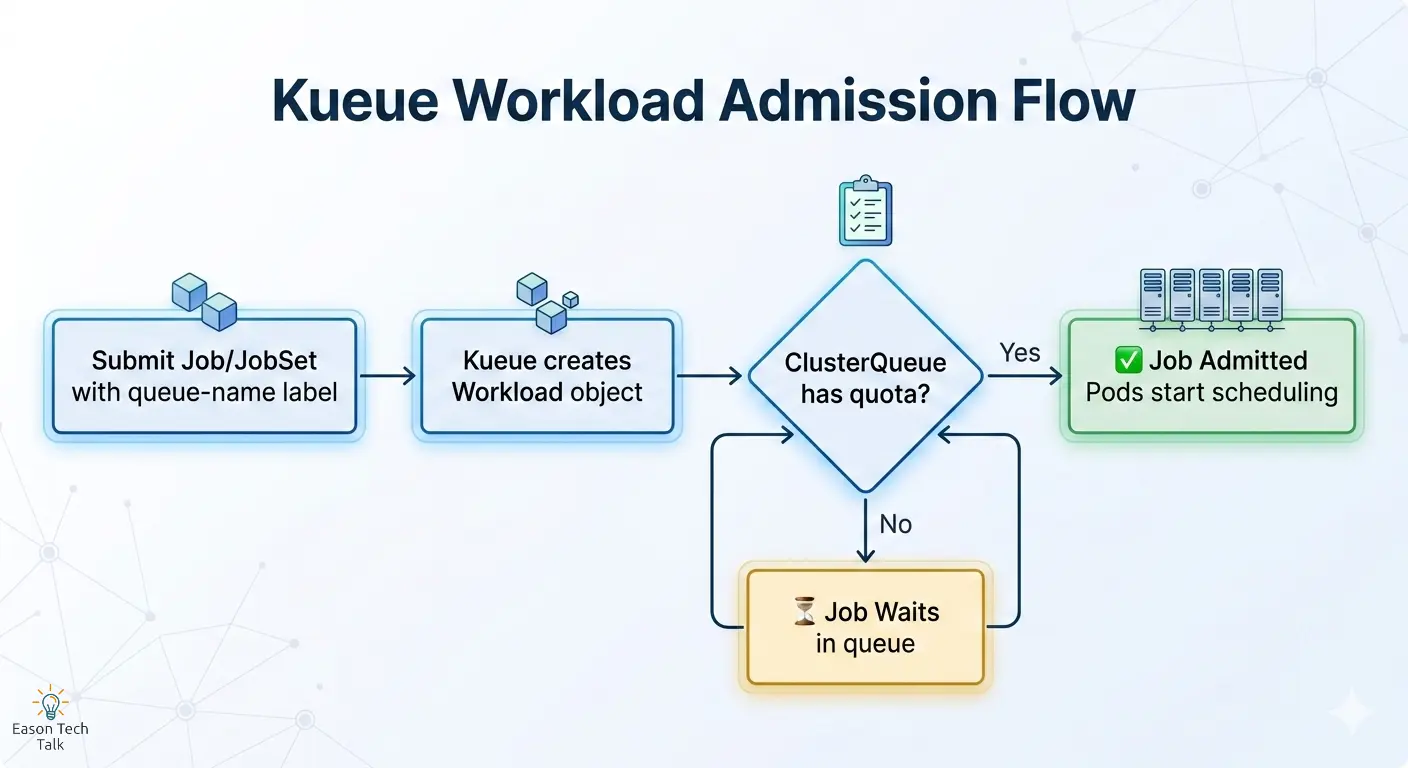
- Submit a Job or JobSet with
kueue.x-k8s.io/queue-nametargeting a LocalQueue. - Kueue creates a Workload object and checks available ClusterQueue quota.
- If quota is sufficient, the Job is admitted and Pods proceed to scheduling.
- If quota is insufficient, the Job waits in queue until resources are released.
Quick Start: Configure Kueue in 3 Steps
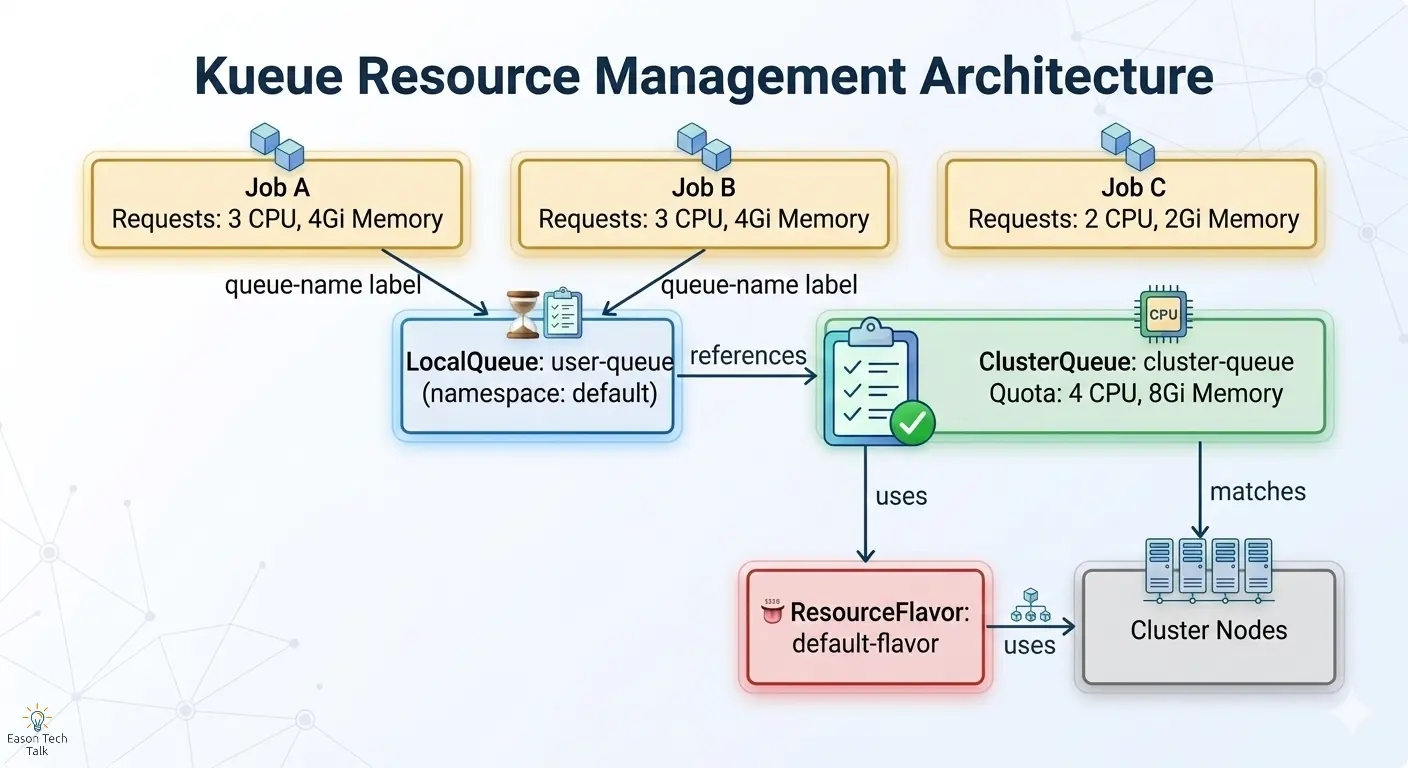
This example uses CPU and memory as quota resources so you can validate Kueue behavior on any standard Kubernetes cluster, without GPUs or TPUs.
Architecture Overview
Step 1: Install Kueue
# Install Kueue
helm install kueue oci://registry.k8s.io/kueue/charts/kueue \
    --namespace kueue-system \
    --create-namespace \
    --wait --timeout 300s
Step 2: Configure ResourceFlavor + ClusterQueue + LocalQueue
# ResourceFlavor: use the default flavor (no node restriction)
apiVersion: kueue.x-k8s.io/v1beta2
kind: ResourceFlavor
metadata:
  name: default-flavor
spec: {}  # Empty spec means any node is eligible
---
# ClusterQueue: set total CPU and memory quotas
apiVersion: kueue.x-k8s.io/v1beta2
kind: ClusterQueue
metadata:
  name: cluster-queue
spec:
  namespaceSelector: {}  # Allow all namespaces
  queueingStrategy: BestEffortFIFO
  resourceGroups:
  - coveredResources: ["cpu", "memory"]
    flavors:
    - name: default-flavor
      resources:
      - name: "cpu"
        nominalQuota: 4      # Total 4 CPU cores available
      - name: "memory"
        nominalQuota: 8Gi    # Total 8Gi memory available
---
# LocalQueue: user-facing submission entrypoint
apiVersion: kueue.x-k8s.io/v1beta2
kind: LocalQueue
metadata:
  namespace: default
  name: user-queue
spec:
  clusterQueue: cluster-queue
Step 3: Submit a Job with the Kueue Queue Label
Submit two Jobs, each requesting 3 CPU. Since ClusterQueue has only 4 CPU total, the first Job is admitted immediately, and the second waits until resources are released.
# Job 1: request 3 CPU + 4Gi memory
apiVersion: batch/v1
kind: Job
metadata:
  generateName: sample-job-
  labels:
    kueue.x-k8s.io/queue-name: user-queue  # Points to LocalQueue
spec:
  template:
    spec:
      containers:
      - name: worker
        image: busybox:1.36
        command: ["sh", "-c", "echo 'Hello from Kueue!'; sleep 30"]
        resources:
          requests:
            cpu: "3"
            memory: "4Gi"
      restartPolicy: Never
  backoffLimit: 0
Use these commands to observe Kueue admission behavior:
# Check ClusterQueue status (quota usage)
kubectl get clusterqueue cluster-queue -o wide

# Check Workload objects (admitted vs waiting jobs)
kubectl get workloads -n default
GKE AI Series